Feature
Task & Project Management
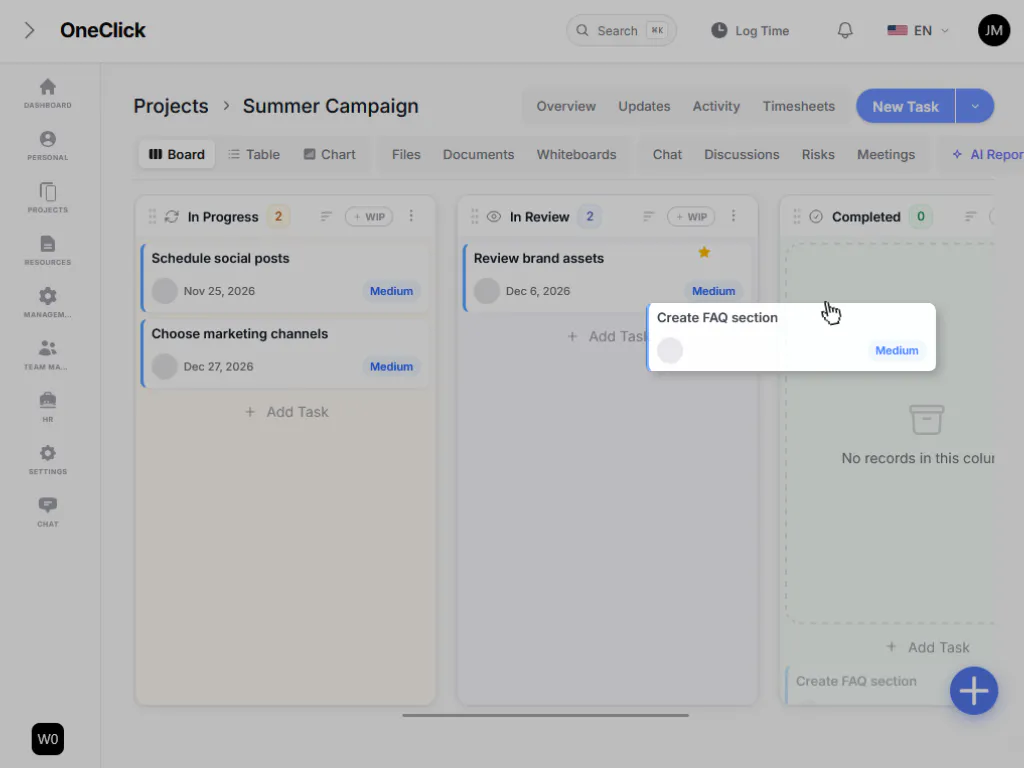
Projects rarely fail because of bad ideas. They fail because of unclear priorities and a lost overview. OneClick gives every project a clear structure: tasks can be displayed as boards, tables, or a timeline, without maintaining the same information twice. Teams instantly see what’s next, what’s blocked, and who’s working on what.
What OneClick gives you
- Kanban board with freely named columns (e.g. Backlog, In Progress, Review, Done) and optional WIP limits
- Table view with full-text search, multi-filtering, and grouping by project, status, or priority
- Gantt timeline with milestones and a selectable resolution (day, week, month)
- Detailed task view with checklists, file attachments, estimated hours, due dates, and a complete change history
- Multi-select bulk actions: favorite, move, or delete
- Risk management with an automatic risk heat map for critical projects
- Personal ‘My Work’ view with a focus mode for distraction-free work
Your benefit
Every team member works in the view that best fits their role: management sees the table, the team sees the board, project leads see the timeline. All data stays perfectly in sync.
Ready to try it?
Start for free — no credit card required — or see how other teams put OneClick to work.